Unlock AI services in DentalCAD®
with monthly exocad Credits!
Unlock AI services in DentalCAD®
with monthly exocad Credits!
If you are in the European Union or the United States, holding a Flex or Perpetual License with an active upgrade contract, you automatically receive a fixed monthly amount of License Credits for DentalCAD’s AI services.
• Flex Licenses include 30 License Credits per month
• Perpetual Licenses receive 10 License Credits per month
• Additional Account Credits can be purchased
* Available with DentalCAD 3.3 Chemnitz and DentalCAD 3.2 Elefsina (build 9036 or later)
Since the release of DentalCAD 3.3 Chemnitz and DentalCAD 3.2 Elefsina (build 9036 or higher), exocad has provided users with a set number of free exocad Credits each month. These credits can be used to access the new AI-powered services TruSmile Video™, TruSmile Photo™ and AI Design. With practical tips from Friedemann Stang, Supervisor Global Customer Support at exocad, and Raphael Remmert, Application Specialist at exocad, users can start using their exocad Credits immediately, for example, to generate an AI-designed crown.
Raphael:
The new AI services are available to users in the European Union and United States who are working with the DentalCAD 3.3 Chemnitz or DentalCAD 3.2 Elefsina. Requirements include either a Perpetual License with an active upgrade contract or a Flex License with an automatic upgrade contract. exocad Credits are required to use these AI services.
Friedemann:
exocad Credits allow access to AI Design, TruSmile Video and TruSmile Photo. TruSmile Video and TruSmile Photo are now available in the Smile Creator Module.
Raphael:
When users open DentalDB, the version number appears in the bottom right corner of the exocad screen. They can also find the DentalCAD engine build number in the settings under “About” (see Fig. 1).

Friedemann:
Yes. Anyone working with the specified software version receives a certain number of exocad Credits included in their upgrade contract or Flex License. These can be viewed in the user’s my.exocad account.
Raphael:
The number of monthly exocad Credits depends on the license model. A Perpetual License with an active upgrade contract includes 10 credits per month. A Flex License with an automatic upgrade contract includes 30 credits per month.
Raphael:
Users start each month with a set number of License Credits. Think of it like a mobile phone plan, where your monthly data allowance resets. Unused Credits do not roll over.
If none or fewer than the available exocad Credits are used within a month, the following month starts again with 10 or 30 exocad Credits.
My advice: Use them, don’t lose them.
If you need more exocad Credits than those included in your plan, you can purchase Account Credits through my.exocad.
Raphael:
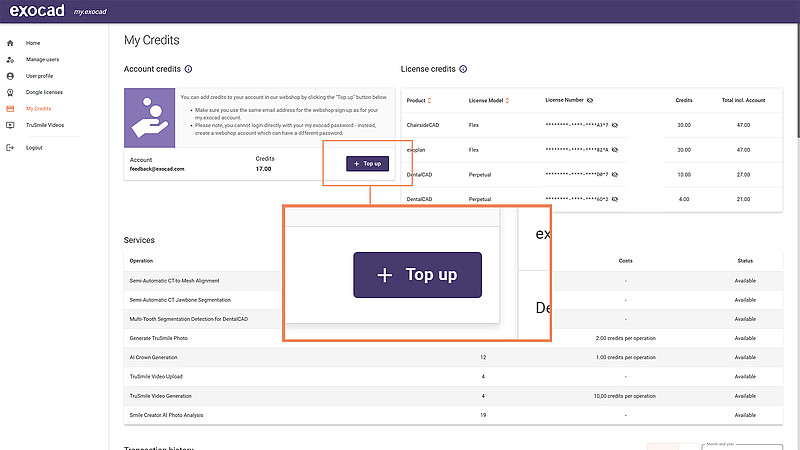
In your my.exocad account, under “My Credits”, click the “+ Top up” button (see Fig. 2) to go directly to the exocad webshop.
Friedemann:
It’s important to register in the exocad webshop before purchasing to ensure your account is linked.
Raphael:
Be sure to use the same email address for both your my.exocad account and your webshop account.
Friedemann:
Purchased Account Credits are tied to the customer account and can be used by multiple license holders within that account.
Friedemann:
One exocad Credit costs one euro. One credit buys an AI crown design; two credits buy a TruSmile Photo; and 10 credits buy a TruSmile Video. The best way to start is with the AI crown design proposal.
Raphael:
Users can view a detailed record of their exocad Credit usage in their my.exocad account under “My Credits” (see Fig. 3).

Friedemann:
To try the AI crown, enable the option once in DentalCAD under “Cloud” (see Fig. 4). At the start of each crown design, the software asks whether you want to generate an AI crown for the selected tooth. Select “yes” to start the AI mode, or “skip” for the conventional process.

Friedemann:
The AI crown design proposal is especially helpful during high-demand production periods since it can be generated in parallel with your conventional workflow.
Friedemann:
Single crown design proposals are typically generated in less than two minutes.
Friedemann:
A design proposal can be created if at least one neighboring tooth and the antagonist are present. If the case is not suitable for an AI crown, the software notifies you immediately.
With DentalCAD 3.3 Chemnitz or DentalCAD 3.2 Elefsina, single crowns can be generated on stumps, abutments or post-and-core structures using AI Design.
The process begins by selecting a crown style from one of many tooth libraries (see Fig. 5). The AI calculates the proposal in the background while you continue working.
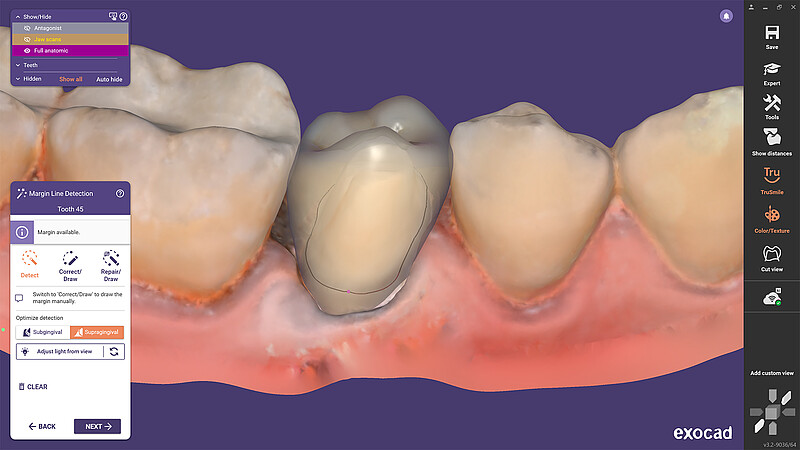
Once the crown design proposal is ready (see Fig. 6), the software requests feedback (see Fig. 7). Star ratings and written comments help the development team improve the software.



Supervisor Global Customer Support at exocad, offers four tips for staying up to date with DentalCAD:
Tip 1: The AI crown design proposal is the perfect introduction to AI services.
Tip 2: Learning by doing: Watch the exocad YouTube tutorials, but also use the software for real cases. Working on real cases under time pressure is always more instructional than demos. For comprehensive training, visit our webshop.
Tip 3: Follow exocad on Instagram, Facebook and LinkedIn, and subscribe to the “exocad NEWS BITES” newsletter to stay current on releases and features.
Tip 4: Try spending just three minutes a day exploring DentalCAD as part of your routine to gradually deepen your knowledge.

Application Specialist at exocad, offers four tips for getting started with exocad Credits:
Tip 1: exocad Credits are available for DentalCAD 3.3 Chemnitz or DentalCAD 3.2 Elefsina, engine build 9036 or higher. Always check your version and license type.
Tip 2: You’ll need the current DentalCAD version, a my.exocad account and an exocad webshop account.
Tip 3: Make sure to use the same email address for both accounts.
Tip 4: In the spirit of “use them, don’t lose them,” now is the time to start exploring exocad’s AI services. Trust yourself!
Note: Regional availability may vary. Terms and conditions apply.